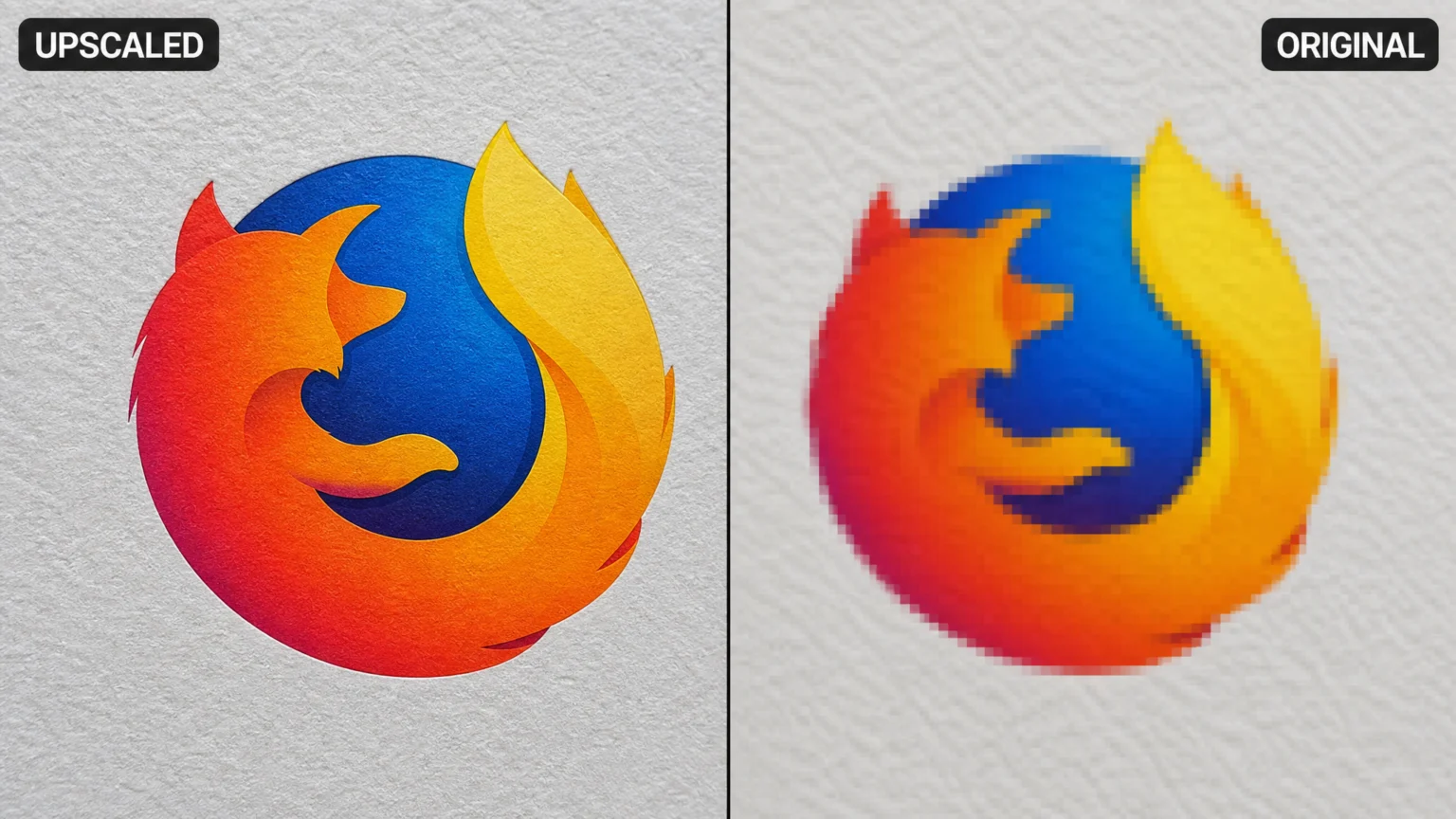
Imagine you have a small brand logo or an older product photo. It needs to be scaled up for a large print, a high-resolution display, or a new marketing campaign. Simply stretching the original file in a standard image editor often results in pixelation and blur. AI upscaling promises to solve this by intelligently adding detail, but without careful attention, it can introduce new problems like unnatural textures, color shifts, or a loss of your brand’s visual integrity.
The core challenge isn’t just making an image bigger; it’s making it bigger while retaining its original character and visual quality. This requires understanding the underlying processes of AI upscaling and how to integrate it into a workflow that prioritizes authenticity over mere enlargement. Ignoring these steps can lead to assets that look sharp but feel subtly off, undermining brand recognition.
How AI Upscaling Generates New Detail
Traditional image enlargement methods rely on interpolation. This technique essentially guesses new pixel values based on neighboring ones, often leading to a soft, blurry result because no new information is actually added. AI upscaling, however, uses machine learning models trained on vast datasets of images. These models predict and generate new pixels that are consistent with the image’s existing patterns and structures. This allows AI upscalers to create detail that wasn’t present in the original, making small images appear sharper and more defined.
The process involves complex algorithms that analyze edges, textures, and color gradients, then reconstruct the image at a higher resolution. While powerful, this predictive nature means the AI can sometimes misinterpret patterns. This can lead to unintended visual changes. For example, a subtle grain in an original photograph might be amplified into a blocky, artificial texture if not properly managed. Understanding this generative aspect is key to anticipating potential issues.
Strategies for Managing Artifacts and Preserving Authenticity
One of the primary concerns with AI upscaling is the introduction of artifacts. These are unwanted visual distortions that can compromise the authenticity of a brand asset. Common artifacts include blockiness, where areas appear pixelated or chunky; haloing, which manifests as bright or dark rings around edges; moiré patterns, which are wavy, interference-like textures; and color bleeding, where colors spread into adjacent areas. These issues can subtly degrade the perceived quality and trustworthiness of your brand visuals.
To mitigate these issues, a refinement or denoise pass is often recommended either before or during the upscaling process. This step helps to smooth out synthetic grain, stabilize textures, and remove any AI-generated anomalies that might become more prominent after enlargement. Think of it as preparing the canvas before adding fine details; a clean base ensures the AI’s additions are more harmonious. For instance, tools like Leonardo.Ai’s Pro Upscaler emphasize pre-processing for cleaner results. This proactive approach is crucial for maintaining visual integrity.
Consider a scenario where a vintage photograph, rich with natural film grain, is upscaled. Without a pre-processing step, the AI might interpret this subtle grain as noise and exaggerate it into an unsightly, blocky texture. A careful denoise pass beforehand can preserve the intended character of the grain while preventing the AI from misinterpreting it. This attention to detail ensures the upscaled image retains its historical authenticity rather than appearing artificially sharpened.
The Critical Role of Color Management in Upscaling
Color consistency is paramount for brand identity. An AI upscaler that shifts your brand colors can undermine recognition and trust. Some upscalers are designed to preserve embedded color profiles, ensuring that the output maintains the original color space (e.g., sRGB, Adobe RGB, CMYK). However, others may convert the image to a different color space, potentially reducing the tonal range and causing noticeable color shifts or chroma bleeding. This can be particularly problematic for logos or product shots where precise color matching is essential.
For instance, if your brand uses a specific shade of blue that is vibrant in sRGB but falls outside the gamut of a narrower color space, an unmanaged conversion could result in a duller, less accurate representation. It’s essential to verify whether your chosen upscaling tool respects color profiles and to perform color correction as part of your post-upscaling workflow to maintain visual fidelity. Using consistent working color spaces throughout the entire process, especially for the target medium, helps prevent unexpected changes. Runway’s AI upscaler documentation, for example, highlights the importance of color profile preservation.
To further illustrate, imagine a brand’s signature red, carefully chosen for its emotional impact. If an AI upscaler converts this image to a different color profile without proper handling, that vibrant red could become a muted, almost orange hue. This subtle shift, while perhaps not immediately obvious to the casual observer, erodes the brand’s visual consistency over time. It’s a small detail that can have a significant cumulative effect on brand perception, making careful color management an indispensable step in the upscaling process.
Integrating AI Upscaling into a Brand Asset Workflow
Effective AI upscaling for brand visuals isn’t a single click; it’s a multi-step process. A robust workflow often includes several checkpoints to ensure quality and consistency:
- Pre-processing: Begin with denoising. If the original image has any noise, AI upscaling can amplify it. A noise reduction step ensures a cleaner starting point. This is especially true for older, lower-resolution images.
- Color Profile Check: Before upscaling, confirm the image’s embedded color profile and decide on the target color space. This prevents unexpected color shifts later in the process.
- Upscaling: Apply the AI upscaler, carefully monitoring for initial artifacts. Many tools offer different upscaling models; experiment to find the one that best suits your image type.
- Post-processing and Refinement: After upscaling, conduct a thorough visual inspection. Look for blockiness, haloing, moiré, and color bleeding. This stage might involve manual touch-ups, further denoising, or color correction to bring the image back into alignment with brand standards.
- Intermediate Formats: When working with high-quality assets, use lossless formats like PNG or TIFF for intermediate saves to avoid introducing compression artifacts. This preserves maximum detail between steps.
This systematic approach helps ensure that the enlarged image retains the sharpness and authenticity required for professional brand visuals. For example, a small, pixelated logo from an old website might be upscaled for a billboard. Without this workflow, the logo could appear sharp but with an unnatural, plasticky texture or slightly desaturated colors, subtly altering the brand’s intended perception. Adhering to these steps ensures predictable, high-quality outcomes.
Consider the trade-off between speed and quality. While some AI upscaling tools offer one-click solutions, a professional workflow prioritizes meticulous control. Skipping pre-processing or post-refinement might save a few minutes, but it risks introducing subtle imperfections that compromise the brand’s visual integrity. For critical brand assets, investing the time in a multi-stage workflow pays dividends in maintaining a consistent and authentic visual identity across all platforms.
Evaluating Upscaling Results for Brand Fidelity
The final step in any AI upscaling process for brand assets is a critical evaluation. This isn’t just about checking for technical flaws but also assessing whether the upscaled image still feels authentic to your brand. Does the texture of a product shot still look natural, or does it have a synthetic sheen? Are the brand colors precisely as they should be, or have they shifted? These subjective qualities are often what define a brand’s visual language.
A good rule of thumb is to compare the upscaled image side-by-side with the original (or a high-quality reference) at both its new intended size and at 100% zoom. Pay close attention to subtle details that define your brand’s visual language. If the AI has introduced new details that weren’t present or intended, consider whether these additions enhance or detract from the image’s authenticity. In some cases, a slightly less aggressive upscaling might be preferable if it better preserves the original character. Prioritizing brand fidelity over maximum sharpness can often yield a more successful result.
For instance, if you’re upscaling a photograph of a fabric texture, the AI might generate new threads that look too uniform or artificial. While technically sharper, this could detract from the natural, organic feel of the original material. In such a case, a slightly softer upscale that retains the original texture’s character would be more aligned with the brand’s aesthetic. The goal is not just a bigger image, but a bigger image that remains true to its source and your brand’s established visual identity.
Ultimately, AI upscaling is a powerful tool, but it requires a discerning eye and a structured approach. By understanding its mechanisms, proactively managing potential issues, and integrating it into a thoughtful workflow, you can leverage AI to enhance your brand visuals without compromising the integrity that makes them recognizable and trustworthy. The goal is to achieve visual impact that aligns perfectly with your brand’s established identity.
To ensure your upscaled images consistently meet brand standards, consider establishing a clear set of visual guidelines for your team. This might include acceptable levels of sharpness, preferred color profiles, and specific instructions for handling textures or fine details. Regular audits of upscaled assets can also help identify and correct any deviations from these guidelines, ensuring that your brand’s visual language remains cohesive and authentic across all applications.
 Logo Template
 Photo Template
 Logo Template
 Logo Template